NETWORK TOPOLOGY
WHAT IS NETWORK TOPOLOGY??
PHYSICAL TOPOLOGY - The arrangement of a cabling is the physical topology.
LOGICAL TOPOLOGY - The path that data travels between computers on a network is the logical topology.
TYPES OF NETWORK TOPOLOGIES
2. BUS TOPOLOGY


- A network topology refers to the layout of the computers and devices in a communications network.
PHYSICAL TOPOLOGY - The arrangement of a cabling is the physical topology.
LOGICAL TOPOLOGY - The path that data travels between computers on a network is the logical topology.
TYPES OF NETWORK TOPOLOGIES
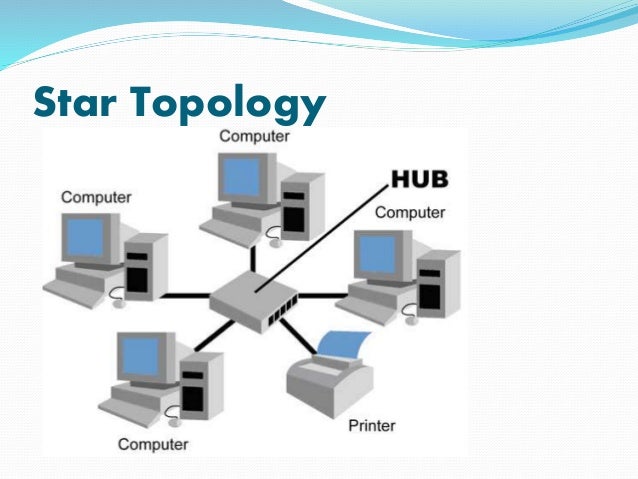
- STAR TOPOLOGY
---- All the computers and other devices on the network connect to a central devices, thus forming a star.
---- 2 types of devices that provide a common central connection point to all the other devices on the network are a hub and a switch.
Hub/ Switch
- The device that provieds a common central connection point for aother devices on a network.
- All data that transfers from one device to another passes through the hub or switch.
- The hub/switch takes a signal that comes from any device and passes it along to all the other devices in the network.
ADVANTAGES AND DISADVANTAGES
ADVANTAGES
|
DISADVANTAGES
|
If one
device fails, only that device is affected.
|
If the hub
or switch fails, the entire network will be inoperable.
|
Devices can
be added to or removed from network with little or no dicruption
|
Requires
more cable than most of the other topologies.
|
Easy to
troubleshoot and isolate problem
|
More
expensive necause cost of the hub/switch
|
2. BUS TOPOLOGY
---- A bus network consists of a single central cable (backbone), to which all computers and othe devices connect.
---- Bus topology uses coaxial cable as a backbone.
- The bus is the physical cable that connects the computers and other devices.
- The bus in a bus network transmit data, instructions, and information as a series of signal.
- Those signals are sent as electrical pukses that travels along the length of the cable in all directions.
- Each devices is connected to the single bus cable through T-Connector.
- A terminator is required at each end of the bus cable to prevent the signal from bouncing and forth on bus cable.
- When a sending device transmits data, the address of the receiving device is included with the transmission.
- If the device address does not match the intended address for the data, the device ignores the data.
- If the data does not match the device address, the data is accepted.
- All devices receive the data but only the receiving device accept them.
ADVANTAGES AND DISADVANTAGES
ADVANTAGES
|
DISADVANTAGES
|
Bus networks
are inexpensive and easy to install.
|
There might
be distruption when computer or other
devices are added or removed.
|
Computers
and other devices can be attached and detached at any point on the bus
without disturbing the rest of the network
|
Because all
systems on the network connect to a single cable or backbone, a break in the
cable will prevent all systems from accessing the network.
|
Failure of
one device usually does not affect the rest of the bus network.
|
It is
difficult to identify the problem if the entire network shut down
|
3. RING TOPOLOGY
---- On a ring network, a cable forms a closed loop( ring) with all the computers and devices arranged along the ring.
- Data transmitted on a ring network travels from device to device around the entire ring, in one direction (clockwise or counterclockwise)
- Token passing is one method for sending data around a ring.
- Each device takes a turn sending and receiving information through the use of a token.
- The token along with any data is sent from the first device to the second device which extracts the data addressed to ot and adds any data it wishes to send.
- Then second device passes the token and data to the third device. etc, until it comes back around to the first device again.
- Only the device with the token is allowed to send data.
- All other devices must wait for the token is allowed to send data.
ADVANTAGES AND DISADVANTAGES
ADVANTAGES
|
DISADVANTAGES
|
The
transmission of data is relatively simple as packets travel in one direction
only
|
A failure in
any cable or device breaks the loop and can take down the entire network.
|
Cable faults
are easily located, making troubleshooting easier.
|
Data packets
must pass through every computer therefore, this makes it slower
|
The uses of
token passing enables all devices in a ring topology to share the network
resources fairly.
|
A ring
network can span a larger distance than a bus network, but it is more
difficult to install
|
Comments
Post a Comment